



Last updated: October 25, 2026
Quick answer: SaaS governance and procurement usually works best when one clear workflow handles requests, risk checks, contracts, and renewals. For many companies, a 7-step approval path is the right starting point, but a professional should tailor it to the company’s risk level, size, and regulated data exposure.
In short: SaaS governance and procurement is the process of buying software in a way that keeps security, finance, legal, and operations aligned instead of letting every team subscribe first and explain later. It suits organizations that already have too many tools, too many contracts, or too much spend hidden in expense reports; for some firms, a professional review is wise before they tighten controls. It is slower than “buy now, pay later,” but it prevents shadow IT, duplicate apps, and renewal surprises. For background on control design, see ISO 27001 and the NIST Computer Security Resource Center.
Key Takeaways
- SaaS governance and procurement sets rules for who can buy software and what checks happen before signature.
- A useful approval workflow usually includes intake, triage, security review, procurement review, legal review, final approval, and ownership.
- SaaS procurement often fails when departments buy tools separately instead of as one system.
- Governance-first fits best when data, access, or compliance risk is the main concern.
What SaaS governance and procurement actually mean
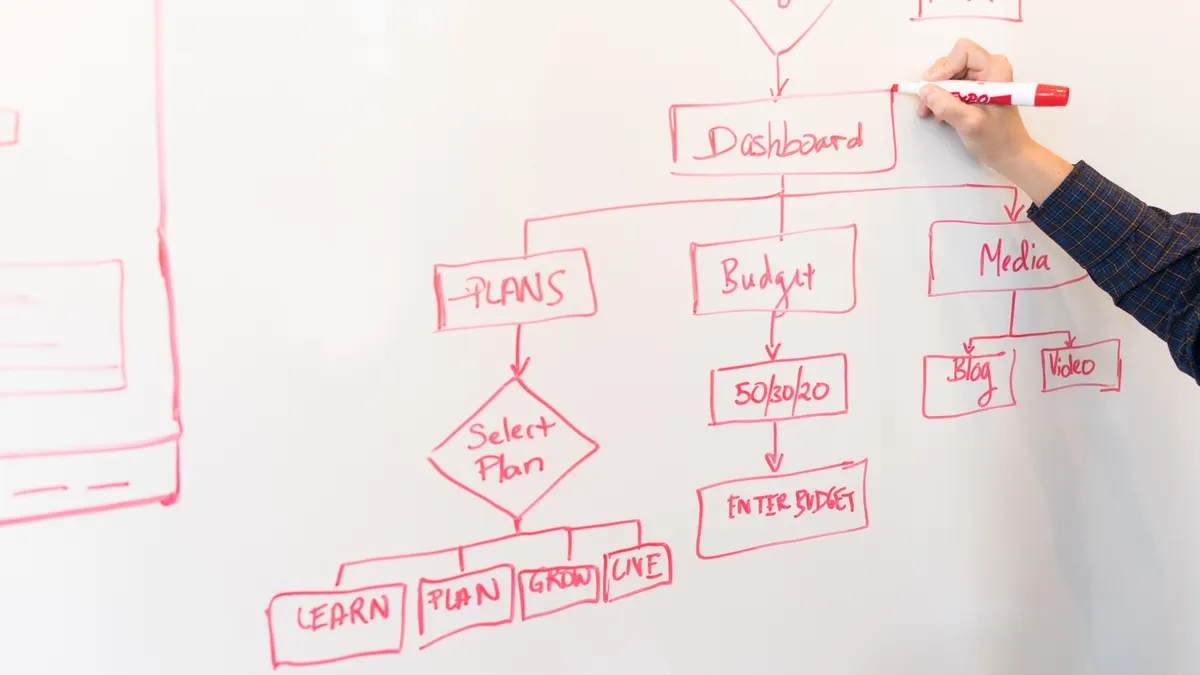
SaaS governance and procurement is the discipline of deciding what software the business may buy, who may buy it, and what checks must happen before it is signed. Procurement handles the commercial side: vendor selection, pricing review, contract terms, order forms, and renewals. Governance handles the policy side: identity controls, data handling, legal review, security review, ownership, and offboarding.
The two are often confused, which is why many companies end up with purchase requests that are technically “approved” but impossible to manage later. A finance team may like a low monthly subscription and still miss that the app stores regulated data outside approved regions. A security team may block a tool and still fail to offer a faster approved route. That gap is where shadow IT grows.
The clean model is simple. A business should define a request path, a risk path, and a buying path. The request path lets employees ask for a tool without hunting through five departments. The risk path determines whether the app touches customer data, personal data, source code, payments, or production systems. The buying path determines who can sign, who can negotiate, and who owns the renewal date.
The most common mistake is treating SaaS like office supplies. A box of paper has no SSO settings, no data retention clause, no subprocessors list, and no admin console. SaaS does. That means a spreadsheet of “approved vendors” is not governance by itself. It is only a start.
The better question is not “Can this team buy software?” It is “Can this organization buy software without creating security exposure, duplicate spend, or contract sprawl?” If the answer is no, the process needs controls, not more enthusiasm.
What should a SaaS approval workflow include?
A useful SaaS approval workflow includes intake, triage, security review, procurement review, legal review, final approval, and post-purchase ownership. If any of those stages is missing, the business will either approve too much or block too much.
The intake form should be short but specific. It needs the vendor name, business owner, intended users, estimated user count, data types involved, integrations required, and whether the tool will touch customer, employee, financial, or source-code data. A “we need a collaboration tool” request is too vague to route correctly. A request that says “marketing wants 18 seats, browser access only, no SSO requirement, no personal data, annual term” can be handled quickly.
Triage is the most underrated step. Not every purchase needs the same review depth. A low-risk note-taking tool used by a small internal team should not get the same treatment as a payroll platform or a CRM with customer records. A tiered process is more realistic: low risk, medium risk, and high risk. The workflow should say which criteria move a request up a tier. Common triggers are SSO requirement, data classification, number of users, API access, admin privileges, and regulatory exposure.
Security review should answer a narrow set of questions: does the vendor support MFA or SSO, can access be removed centrally, what data is stored, where is it hosted, what subcontractors are used, and how is data deleted on exit? If the company uses a questionnaire, keep it short enough that it is actually completed. A 200-question form often creates delay without better decisions.
Procurement review should focus on commercial terms that change long-term cost: auto-renewal, notice periods, price uplifts, seat minimums, payment terms, and termination rights. The contract that looks fine on day one can become expensive on day 366 if nobody tracks the renewal date. Legal review should focus on liability caps, data processing terms, audit rights, governing law, and any obligation that creates hidden work for internal teams.
The biggest weakness of a formal workflow is speed. If every request waits two weeks, employees route around the process. That is why the workflow must have a fast lane for low-risk software and a clear escalation path for exceptions. A good system is not the one with the most checks; it is the one people will actually use.
Why SaaS procurement keeps failing inside good companies

SaaS procurement fails most often because the business buys software by department, not by system. Sales buys one set of tools, marketing buys another, engineering buys a third, and finance only sees the bill when renewals hit. The company ends up with overlapping subscriptions, inconsistent security posture, and no central owner for half the stack.
The second failure is buying on urgency. A team misses a deadline, gets a demo, approves a card, and starts using the tool the same day. That can be fine for low-risk software, but it is a poor pattern for anything that stores data or touches identity. Card-based buying is convenient and dangerous in the same sentence.
The third failure is treating procurement as a one-time event instead of a lifecycle. The buying decision matters, but the renewal, expansion, and exit matter just as much. A SaaS app that begins as five seats can grow into 150 seats, a custom integration, and a messy offboarding project. If nobody owns the lifecycle, spend and risk both drift upward.
The fourth failure is policy without a fallback. A company that says “No unsanctioned SaaS” but provides no approved path is not governing software; it is only pushing people into workarounds. A procurement policy must tell employees what to do next, not just what they may not do.
The fifth failure is missing business ownership. Every SaaS tool needs a named owner in the business, not only in IT. If the owner leaves, the app often keeps billing, keeps retaining data, and keeps renewing. A control that depends on memory is not a control.
The practical fix is to create a single inventory of apps, assign every app an owner, attach every contract to a renewal date, and route purchases through a shared intake process. Even a simple spreadsheet can help at first, but a spreadsheet is not enough if the organization is large, regulated, or renewing dozens of tools each quarter.
The honest side-by-side: governance-first vs procurement-first
Governance-first wins when the main risk is data, access, or compliance. Procurement-first wins when the main pain is spend, renewals, and vendor sprawl. The right sequence depends on what is hurting the business today.
| Criteria | Governance-first | Procurement-first | Winner for [condition] |
|---|---|---|---|
| Primary goal | Control data, access, and policy before purchase | Control spend, terms, and renewals before approval | Governance-first for regulated data; procurement-first for runaway spend |
| Speed for low-risk apps | Slower unless there is a fast lane | Usually faster for simple buy requests | Procurement-first for small internal tools |
| Security posture | Strong when identity and data review are required | Often weaker unless security is built into the workflow | Governance-first when the app handles sensitive data |
| Budget visibility | Good only if ownership and inventory are enforced | Usually better at keeping contracts visible | Procurement-first for finance-led cleanup |
| Renewal control | Can miss commercial details if contracts are not centralized | Strong if renewal dates and notice periods are tracked | Procurement-first for auto-renewal risk |
| User experience | Can feel bureaucratic without clear thresholds | Feels easier if request paths are simple | Procurement-first for adoption |
| Audit readiness | Better when controls, approvals, and data checks are documented | Better on contract evidence than on operational controls | Governance-first for audits |
| Vendor exit | Better if data deletion and offboarding are part of approval | Better if termination rights and notice periods are tracked | Depends on whether technical or commercial exit is harder |
| Best organizational fit | Mid-market and enterprise teams with sensitive data | Smaller teams or finance-led consolidation projects | Governance-first for complexity; procurement-first for cleanup |
The table points to a blunt conclusion: governance-first is the safer default for organizations that handle customer, employee, or production data; procurement-first is the faster fix when the main problem is budget leak and renewal chaos. Neither works well if the company has no app inventory, no owner model, and no approved exceptions path.
The trade-off is real. Governance-first reduces risk but can slow purchasing unless the tiers are clear. Procurement-first speeds buying but can leave security teams cleaning up after the fact. A smart program does both, but it has to choose one as the front door.
SaaS governance and procurement for security, legal, and finance
The best SaaS program does not make one department the gatekeeper. It gives each function a specific job and a defined threshold. Security checks risk, legal checks terms, finance checks spend, and the business owner checks usefulness. That sounds simple until the process gets vague, so the thresholds must be written down.
Security should own identity, access, data handling, and vendor assurance. That means asking whether the app supports SSO, MFA, role-based access, audit logs, data export, and deletion on exit. For many companies, a vendor questionnaire is enough for low-risk tools, but higher-risk tools may need a deeper review of subprocessors, data residency, penetration testing evidence, or SOC 2 Type II reports if the vendor has one. A SOC 2 report is not a magic stamp, but it does give a structured way to assess controls.
Legal should own contract language that affects liability and data rights. The most important terms are not the marketing phrases; they are the data processing addendum, limitation of liability, indemnity, audit rights, and termination clauses. If a vendor will process personal data, the company should check whether a DPA is required and whether the vendor’s standard terms fit the business’s risk appetite.
Finance should own the commercial view: contract term, billing cadence, seat commitments, auto-renewal, and approval authority. A low monthly figure can still be a poor deal if the contract auto-renews for 12 months without a reminder or if the vendor requires an annual commitment after month two. The finance team should also watch for duplicate tools that do the same job. Two $20 subscriptions are often easier to miss than one $400 subscription.
The business owner should own business value and renewal justification. That owner should know why the app exists, who uses it, and what would happen if it were removed. If nobody can answer those questions at renewal, the tool is probably dead weight.
The drawback of splitting responsibilities is delay. Each function can become a bottleneck if it treats every request as a special case. The fix is policy design, not just more approvals. A low-risk tool may need only a business owner and procurement review. A high-risk tool may need all four functions and a more detailed checklist. The point is consistency, not ceremony.
For process design, the ISO 27001 control family and the NIST guidance on access and supplier management are useful reference points, and both are worth reviewing directly from the issuing organizations: the ISO and the NIST Computer Security Resource Center. Those sources do not tell a company how to buy every app, but they do anchor the conversation in recognized control language.
How to run SaaS renewals without wasting money
SaaS renewals should be treated as decisions, not calendar reminders. The best renewal process starts 90 to 120 days before a contract ends, especially for annual agreements with notice periods. That window gives time to check usage, support quality, contract terms, and whether a lower-risk or lower-cost replacement exists.
The first step is to confirm actual use. Many companies pay for seats that were assigned once and never touched again. Usage data from the admin console, login logs, and license assignments can show whether the team is still active. If the app is mission-critical, low usage may still be acceptable. If the app is a convenience tool, low usage is often a sign to reduce seats or cancel.
The second step is to review vendor performance. Did the app meet the use case? Did it require more manual work than expected? Did it create support tickets, integration headaches, or training burden? A renewal should include the cost of administration, not only the subscription price.
The third step is to compare alternatives before the renewal notice deadline. That does not mean running a full procurement event every year. It means knowing whether the current vendor still deserves the spend. If the company is locked into a term, comparison may still give leverage in negotiation, even if the vendor is not replaced.
The fourth step is to document the decision. Renew, renegotiate, reduce, or retire — those are different actions and should have different approvals. If the company is audited later, it should be able to show who approved the renewal and on what basis.
The biggest renewal mistake is waiting until the invoice arrives. By then, notice periods may have passed and the vendor may already be entitled to another term. A policy that says “review renewals” is too weak unless it also names the review owner and the lead time.
Renewal management is unglamorous, but it is where SaaS spend is most often won back. It is also where a company sees the real difference between an app the business uses and an app the business merely tolerates.
What a good SaaS stack policy looks like
A good SaaS stack policy is short enough to read and specific enough to enforce. It should answer six questions: who may request software, who may approve it, what risk checks are required, what contract terms are mandatory, who owns the app after purchase, and how renewals are handled.
The policy should define spend thresholds. For example, purchases below a certain internal limit may need only a manager and finance check, while anything above that limit or anything touching regulated data needs additional review. The exact threshold depends on company size and risk profile, so the policy should not copy another company’s number. A 50-person business and a 5,000-person business cannot use the same control logic and expect the same outcome.
The policy should define forbidden shortcuts. Common examples are buying with personal cards, using free plans for production work, and sharing admin credentials across teams. Free tiers are especially risky when they become the backbone of a workflow. If a tool matters, the company should know who owns it and how data is exported when it changes tiers or shuts down.
The policy should also define exception handling. Exceptions will happen. A launch deadline, a customer commitment, or a merger can justify bypassing the standard path. The policy should state who can approve exceptions, how long they last, and what conditions they expire under. An exception without an expiration date becomes a second policy.
Finally, the policy should require an inventory. Without an inventory, governance is guesswork. The inventory does not need to be a heavy platform on day one. It does need to include the app name, owner, purpose, user count, contract end date, data classification, and renewal contact. If the business cannot name what it owns, it cannot govern it.
The weakness of a strong policy is that it can become paperware. That happens when the document looks finished but nobody uses it at the point of purchase. The answer is embedded intake, not a PDF forgotten in a folder.
When the usual answer is wrong
The usual answer flips when the company is in one of four situations.
First, if the organization is tiny and buying only a handful of low-risk tools, a heavy governance program is overkill. A startup buying email, file storage, and a project tracker does not need enterprise-grade procurement theater. It does need a simple rule for ownership, billing, and offboarding. A 10-person company with one admin can get by with a lighter process than a regulated 500-person firm.
Second, if the business is under audit pressure or handles sensitive data, procurement-first is not enough. A finance-only process can miss identity risks, data residency issues, and unauthorized integrations. In that case, governance must lead because the real threat is not overspend; it is exposure.
Third, if the company already has a bad renewal problem, start with procurement. The fastest savings may come from consolidating contracts, centralizing renewal dates, and stopping duplicate subscriptions. Security review still matters, but the first visible win is usually commercial.
Fourth, if a company buys many niche tools through department cards, the right fix may be to remove card buying authority for anything above a low threshold. That sounds harsh, but it stops the pattern where one easy purchase becomes a long-lived contract nobody owns. The downside is frustration for teams that move quickly, so the company must pair the restriction with a fast intake lane.
The common thread is simple: the right process depends on the cost of failure. If failure means extra spend, procurement leads. If failure means a data incident or contract breach, governance leads.
The verdict: which approach to choose
Choose governance-first if the software will handle customer data, employee data, source code, payments, or any system that needs strong identity control. Choose procurement-first if the main problem is scattered buying, missed renewals, and duplicate subscriptions. Neither if the company has no owner model, no inventory, and no appetite to enforce exceptions, because that leaves the business with process theater and the same chaos underneath.
That is the practical answer for SaaS governance and procurement. Start with the risk that hurts most, define the minimum checks that matter, and make the renewal date part of the purchase decision instead of an afterthought. A good program protects the company without turning every request into a project.
Drafted with AI; not yet reviewed by a person.





Leave a comment